Activities, intents, tasks, and window ownership
Understand how the system creates an Activity, delivers input, manages tasks, and defines the boundary of a screen host.
An Activity is an Android application component that owns a window and participates in the system task model. The operating system, not ordinary application code, creates it in response to a launcher action, an explicit intent, a verified link, or restoration of a task. That ownership explains why an Activity instance is replaceable and why it is an unsuitable home for durable business state.
Many modern applications use one Activity to host a navigation system. The architecture does not remove the Activity contract. A screen host must still accept and validate external input, configure the window, coordinate system callbacks, and leave data loading and business decisions to longer-lived collaborators.
Learning goals
- Define the window-scoped responsibilities of an Activity and identify work that belongs elsewhere.
- Trace an intent from component resolution to validated arguments.
- Describe a task, its back stack, and the consequences of common launch modes.
- Keep the Activity limited to theme, content, navigation host, and system callbacks rather than network or business rules.
What an Activity is
From the platform’s point of view, an Activity is one of the four application components (with Service, BroadcastReceiver, and ContentProvider). It is declared in the manifest, may have intent filters (launcher, deep links), and participates in the system’s task model.
<activity
    android:name=".MainActivity"
    android:exported="true"
    android:windowSoftInputMode="adjustResize">
    <intent-filter>
        <action android:name="android.intent.action.MAIN" />
        <category android:name="android.intent.category.LAUNCHER" />
    </intent-filter>
</activity>
android:exported must be explicit for components with intent filters. Launcher Activities are exported; internal Activities that only receive explicit intents from your app should not be.
What an Activity should own
An Activity is a good home for window-scoped setup:
- Applying the app theme / edge-to-edge window configuration
- Setting the content view (XML, View Binding, or
setContent { }for Compose) - Hosting a NavHost / Fragment container
- Registering Activity Result contracts (runtime permissions, photo picker, document open)
- Forwarding system events (new intent, configuration hints) into navigation or a ViewModel
class MainActivity : ComponentActivity() {
    override fun onCreate(savedInstanceState: Bundle?) {
        super.onCreate(savedInstanceState)
        enableEdgeToEdge()
        setContent {
            AppTheme {
                AppNavHost()
            }
        }
    }
}
What it should not own
- Network calls and database queries
- Business rules (“can this user checkout?”)
- Long-lived state that must survive rotation without a ViewModel / saved state
Those responsibilities belong in ViewModels, use cases / repositories, and durable storage. An Activity that becomes a god-class is hard to test and dies with every configuration change unless you carefully stash everything.
How Android creates an Activity
Typical path for a cold start of the launcher Activity:
- User taps the icon (or a deep link resolves to your app).
- The system starts your process if needed (Zygote → your
Application). - The system creates the Activity instance and calls lifecycle methods beginning with
onCreate. - Your
onCreatesets up the UI.
You never new MainActivity() yourself for production navigation. You request the system to start it via an Intent.
Intents: explicit, implicit, and extras
Explicit intents
Target a specific component in your app:
val intent = Intent(this, DetailActivity::class.java).apply {
    putExtra(EXTRA_ARTICLE_ID, articleId)
}
startActivity(intent)
Implicit intents
Declare an action and let the system resolve a handler (share sheet, browser, maps):
val send = Intent(Intent.ACTION_SEND).apply {
    type = "text/plain"
    putExtra(Intent.EXTRA_TEXT, shareUrl)
}
startActivity(Intent.createChooser(send, null))
Always handle the case that nothing can resolve the intent (resolveActivity / try-catch around start, depending on API level and policies).
Reading extras safely
class DetailActivity : AppCompatActivity() {
    override fun onCreate(savedInstanceState: Bundle?) {
        super.onCreate(savedInstanceState)
        val id = intent.getStringExtra(EXTRA_ARTICLE_ID)
        if (id.isNullOrBlank()) {
            finish()
            return
        }
        // hand id to ViewModel / navigation args
    }
}
Prefer type-safe navigation arguments (Navigation component, Compose Navigation) over raw string keys when you can. Still understand raw extras - interviewers and legacy code use them.
onNewIntent
If an existing Activity instance receives another intent (common with singleTop / launcher re-entry), onCreate is not called again. Override onNewIntent and call setIntent(intent) so later getIntent() reflects the latest data:
override fun onNewIntent(intent: Intent) {
    super.onNewIntent(intent)
    setIntent(intent)
    handleIntent(intent)
}
Tasks, back stack, and launch modes (junior depth)
- A task is a stack of Activities the user can move through with Back.
- Back pops the top Activity (or finishes the app’s task when the stack is empty, depending on system behavior and whether you intercept back).
- Launch modes (
standard,singleTop,singleTask,singleInstance) change whether a new instance is created or an existing one is reused.
Junior-level expectations:
| Mode | Intuition |
|---|---|
standard (default) | New instance every time |
singleTop | Reuse if already on top; delivers onNewIntent |
singleTask | Reuse in task; may clear Activities above it |
Prefer the Navigation component’s back stack over hand-rolling launch-mode tricks. Know that deep links and notification taps often create surprising stacks if you do not design the entry path.
Activity Result API
The modern replacement for startActivityForResult is the Activity Result API:
private val pickImage = registerForActivityResult(
    ActivityResultContracts.GetContent()
) { uri: Uri? ->
    if (uri != null) viewModel.onImagePicked(uri)
}

// somewhere in a click handler
pickImage.launch("image/*")
Register contracts before the Activity is STARTED (typically as a property initializer or in onCreate before STARTED). Do not register only in a click listener after the lifecycle has moved on - you will crash or miss results.
Configuration changes and why “thin” matters
When the user rotates the device (and you have not disabled config changes), Android destroys and recreates the Activity. Anything stored only in Activity fields is gone unless you:
- Hold it in a ViewModel (survives configuration change),
- Persist it in SavedStateHandle /
onSaveInstanceState(survives process death for small state), - Or reload it from a durable source (database, DataStore).
This is why network calls and screen state belong outside the Activity instance.
// Fragile: lost on rotation
private var draft: String = ""

// Better: ViewModel retains draft across config change
class ComposerViewModel : ViewModel() {
    var draft: String = ""
}
Process death is a separate, harder problem - covered in the lifecycle lesson.
Single-Activity architecture
Most greenfield apps use one Activity as a window-level host for a navigation graph:
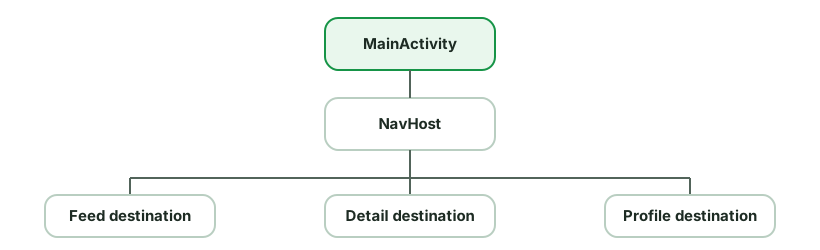
Benefits:
- Shared window setup, theme, and system bar handling in one place
- Navigation as a graph, not a mesh of
startActivitycalls - Easier predictive back and deep link modeling
You may still use multiple Activities for separate tasks (e.g. a picture-in-picture player, authentication in a different task affinity, or a library that forces it). Know the default recommendation without treating it as dogma.
Manifest details juniors should recognize
android:exported: required for intent-filter components; security-sensitive.android:launchMode: stack behavior.android:windowSoftInputMode: keyboard vs layout (adjustResize/adjustPan).android:configChanges: only handle yourself if you truly know what you are doing; usually let the system recreate.- Theme / splash:
SplashScreenAPI and theme attributes on the launcher Activity.
Common pitfalls
- Doing I/O in
onCreateon the main thread - jank and ANR risk. - Leaking Activity context into singletons, static fields, or coroutines that outlive the Activity.
- Ignoring
savedInstanceStatewhen restoring UI that is not in a ViewModel. - Assuming
onCreateruns for every intent - false foronNewIntentcases. - Putting business logic in the Activity so unit tests require Robolectric or instrumentation for no good reason.
Examination prompts
- “What is an Activity?” - component + window + system-managed lifecycle.
- “Difference between explicit and implicit intents?”
- “What happens on rotation?” - destroy/recreate; ViewModel survives; process death is different.
- “Why single-Activity?” - navigation, shared window, modern Compose/Fragment hosts.
- “How do you return a result from another screen?” - Activity Result API.
Practice checklist
- Start a second Activity with an extra; read it safely; finish if missing.
- Register a
GetContentcontract and display the picked URI. - Put a counter in an Activity field, rotate, observe the loss; move it to a ViewModel and confirm it survives.
- Sketch your favorite app as one Activity + navigation destinations.
What you should be able to explain
- System ownership of Activity instances and why constructors are not your API.
- Thin Activity vs fat Activity failure modes.
- Intent delivery, extras, and
onNewIntent. - How configuration change interacts with Activity-held state.
Next: Fragments - reusable UI pieces with a view lifecycle that is not the same as the Fragment instance lifecycle.
Discussion
Comments are powered by GitHub Discussions. Sign in with GitHub to join in.