Android architecture, repositories, and unidirectional data flow
Structure a feature around explicit data ownership, repositories, UI state, and boundaries that improve correctness and testability.
Architecture is useful when it makes a change safer to reason about, test, and ship. It is not a contest for the most folders. Begin with a feature boundary and assign each collaborator a distinct reason to change: the UI renders state and receives intent, a state holder coordinates screen behavior, and a repository exposes application data while coordinating its sources.
The resulting flow is deliberately one-directional. Input enters at the UI boundary, work reaches the data layer through explicit dependencies, and observable state returns for rendering. This prevents the screen from becoming an untraceable mixture of database calls, HTTP callbacks, and transient view state.
Learning goals
- Apply Android layering as a response to responsibilities rather than a prescribed folder hierarchy.
- Keep transport and persistence representations out of the UI.
- Use a local database as a source of truth when a feature needs durable observable data.
- Inject dependencies with explicit lifetimes and replacement points.
- Explain MVVM and unidirectional data flow in terms of data ownership and testability.
A practical default shape
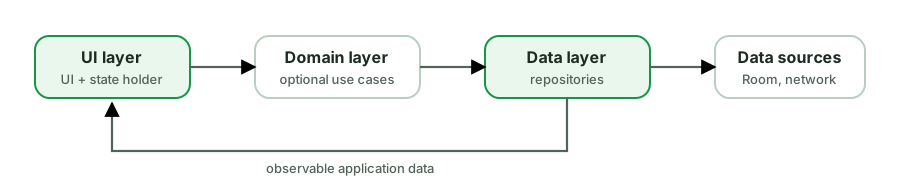
Google’s guidance for modern apps aligns with: UI layer + data layer, optional domain layer when logic is rich enough to justify it.
UI layer
- Renders
UiState - Forwards user actions
- Owns ephemeral UI chrome when appropriate
ViewModel
- Holds UI state
- Maps user intents to use of repositories
- Survives configuration change
- Does not know about
View/Context(except carefully constrained app context via DI if absolutely needed)
Data layer (repositories)
- Single API for a feature’s data needs
- Coordinates cache + network
- Hides Retrofit/Room types behind domain models
Do not expose storage or network shapes to the UI
// API
data class ArticleDto(val id: String, val title: String, val body: String)

// DB
@Entity
data class ArticleEntity(val id: String, val title: String, val body: String, val cachedAt: Long)

// Domain
data class Article(val id: String, val title: String, val body: String)

// UI
data class ArticleUi(val id: String, val title: String, val preview: String)
class ArticleRepository(
private val api: ArticleApi,
private val dao: ArticleDao,
) {
fun observeArticles(): Flow<List<Article>> =
dao.observeAll().map { rows -> rows.map { it.toDomain() } }
suspend fun refresh() {
val remote = api.fetchAll()
dao.replaceAll(remote.map { it.toEntity(now = clock.now()) })
}
}Why this matters:
- Backend renames do not force UI rewrites.
- Schema migrations stay in the data layer.
- UI tests do not need JSON fixtures shaped like production APIs.
Offline-first pattern (mid-level)
- UI collects from local Flow (Room).
- Refresh writes remote → local.
- Errors during refresh can show a non-blocking banner while cache still displays.
class FeedViewModel(private val repo: ArticleRepository) : ViewModel() {
    val articles = repo.observeArticles()
        .map { list -> list.map(Article::toUi) }
        .stateIn(viewModelScope, SharingStarted.WhileSubscribed(5_000), emptyList())

    private val _refreshError = MutableStateFlow<String?>(null)
    val refreshError = _refreshError.asStateFlow()

    fun refresh() {
        viewModelScope.launch {
            runCatching { repo.refresh() }
                .onSuccess { _refreshError.value = null }
                .onFailure { _refreshError.value = "Couldn't refresh" }
        }
    }
}
This matches product truth: what the user sees is what we have stored, not the last HTTP response body in memory.
Unidirectional data flow (UDF)
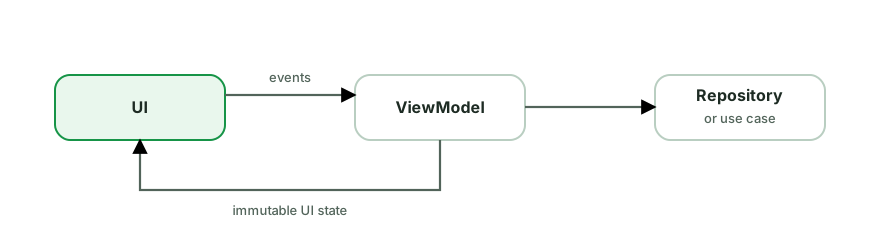
Benefits: easier reasoning, fewer two-way binding bugs, straightforward tests (“given event, assert state”).
MVI is a stricter variant with explicit intents and reducers. MVVM with StateFlow is often “UDF in practice.” Interviews care that you can compare them without religion:
| Approach | Strength | Risk |
|---|---|---|
| MVVM + StateFlow | Familiar, flexible | Logic can bloat ViewModel |
| MVI | Explicit intents, audit trail | Boilerplate, overkill for tiny screens |
| MVP | Testable presenters (legacy) | Verbose view interfaces |
Dependency injection
Constructor injection makes fakes easy:
class ArticleViewModel(
    private val repo: ArticleRepository,
) : ViewModel()
With Hilt:
@HiltViewModel
class ArticleViewModel @Inject constructor(
    private val repo: ArticleRepository,
) : ViewModel()

@Module
@InstallIn(SingletonComponent::class)
object DataModule {
    @Provides @Singleton
    fun api(retrofit: Retrofit): ArticleApi = retrofit.create()
}
Scopes:
@Singleton- process-wide (Retrofit, DB)- ViewModel scope - per screen back-stack entry
- Activity / NavGraph scopes when you need shared state across destinations
Mid-level expectation: explain why DI (testability, lifetime, swappable implementations), not only “we use Hilt.”
Error handling as a design choice
Map low-level failures to user-meaningful outcomes at a boundary:
sealed class DataResult<out T> {
    data class Ok<T>(val value: T) : DataResult<T>()
    data class Err(val reason: Reason) : DataResult<Nothing>()

    enum class Reason { Network, Unauthorized, NotFound, Unknown }
}
Avoid leaking HttpException into Compose. The UI needs “session expired → re-login,” not “HTTP 401.”
When to add a domain / use case layer
Add use cases when:
- Multiple ViewModels share the same orchestration
- Business rules are non-trivial and deserve unit tests without Android deps
- You need a stable API for multiplatform / multi-UI
Skip use cases when they are 1:1 wrappers around a single repository method - that is ceremony without benefit.
Navigation and architecture
- Navigation arguments should be IDs, not giant objects.
- Shared ViewModels can be scoped to a navigation graph for multi-step flows (checkout).
- Keep
NavControllerat the UI boundary. A ViewModel processes the user action and exposes the resulting destination or screen state; the UI performs navigation through a controlled, acknowledged effect. - Treat deep-link arguments as external input and reload the required data through the feature boundary.
Common pitfalls
- ViewModel calls Retrofit and Room directly with no repository - fine for tiny apps, painful as features grow; know the trade-off.
- God repositories that know every table and every API.
- Passing
Contextinto ViewModels for string formatting - inject resources carefully or format in UI. - Over-modularizing early (senior topic) without ownership pain.
- Two sources of truth - memory list and database list that diverge.
Examination prompts
- “Draw the layers for a notes app with offline support.”
- “Why repository?”
- “MVVM vs MVI?”
- “Where do you map DTO → domain → UI?”
- “How does DI help testing?”
- “What belongs in the ViewModel vs repository?”
Strong answers mention change frequency, test boundaries, and source of truth.
Practice checklist
- Implement a repository with Room Flow + network refresh.
- Write a ViewModel test with a fake repository.
- Refactor a screen that uses DTOs in the UI into mappers.
- Document your app’s layering in half a page - if you cannot, the architecture is accidental.
What you should be able to explain
- Responsibilities of UI, ViewModel, repository.
- Offline-first observation pattern.
- Model mapping at boundaries.
- DI scopes and test fakes.
- UDF without dogma.
Next: Testing and performance - prove behavior and diagnose jank with the architecture you just structured.
Discussion
Comments are powered by GitHub Discussions. Sign in with GitHub to join in.