Mobile System Design
Designing offline-first apps, caching, pagination, image loading, and client-side architecture at scale.
All done - nice work.
Mobile system design interviews test whether you can turn product requirements into a reliable client under real device constraints. The prompt may be a feed, chat app, sync engine, analytics library, or reusable SDK. Interviewers care about data flow, failure recovery, operability, and trade-offs. A large backend diagram is not a substitute for a coherent client design.
A simple study path
Start with the starred interview framework and client-foundation questions. Pick one familiar app and describe its user flow, data model, API contract, local source of truth, loading states, and failure states. Then add offline support, pagination, sync, security, observability, and testing. Practise one product design and one SDK or library design because the constraints differ.
The client concerns you should always check
- Requirements and scale: critical flows, data volume, freshness, supported devices, and accessibility.
- State and storage: source of truth, schema, cache policy, offline behavior, and process death.
- Network and sync: API contract, pagination, idempotency, retries, conflicts, and real-time delivery.
- Resources: memory, disk, battery, bandwidth, startup, and rendering performance.
- Trust: authentication, privacy, secure storage, abuse resistance, and data deletion.
- Operations: metrics, logs, rollout, migrations, backward compatibility, and tests.
How interviewers push the design
After the first diagram, expect constraints such as “the network disappears”, “two devices edit the same item”, “the process dies”, “the SDK must not slow startup”, or “the server accepted the request but the response was lost”. Keep important state durable, make retries safe, and say what the user sees during uncertainty.
The stars mark the questions worth covering first. Product case studies are practice arenas, not scripts to memorize.
Useful references
Frequently asked. Prioritize these in your first pass.
Use it in practice
Common implementation choices, debugging, and trade-offs.
Interview framework
How do you approach a mobile system design interview?
Drive the conversation with a structured framework - interviewers grade your process and trade-off reasoning, not a memorized answer. Keep the design client-focused, but define the minimum server contracts the client depends on: pagination, synchronization, idempotency, authentication, and real-time delivery semantics.
A repeatable structure (~45 min):
1. Clarify requirements (5 min). Don’t jump in. Pin down:
- Functional - what features? (feed: scroll, like, post? offline?)
- Non-functional - offline support, real-time, scale, target devices/OS versions, battery/data constraints.
- Scope - “Should I focus on the feed rendering and data layer?” Narrow it.
2. Define the API / data contract (5 min). The endpoints the client calls, request/response shapes, pagination style (cursor), and real-time mechanism (WebSocket/FCM/poll). This frames everything downstream.
3. High-level architecture (10 min). Layered client design:
- UI (Compose/Views + ViewModel/UDF)
- Domain (use cases, if needed)
- Data (repository, single source of truth, local DB + network + cache)
- Draw the data flow: UI ↔ ViewModel ↔ Repository ↔ {Room, Network}.
4. Deep-dive the highest-risk parts (15 min). Choose the decisions that dominate the design and examine them closely:
- Caching & offline - DB as source of truth, freshness policy.
- Pagination - cursor-based, prefetch.
- Sync & conflicts - optimistic updates, reconciliation.
- Images/media - downsampling, prefetch, cancellation.
- Real-time - WebSocket vs FCM vs polling.
5. Trade-offs and wrap-up (5 to 10 min). Name the tensions explicitly: memory vs smoothness, freshness vs data usage, consistency vs latency, battery vs real-time behavior. Mention failure modes, error handling, and what you would measure.
Cross-cutting concerns to weave in: offline behavior, error/retry, security (token storage), performance (jank, startup), battery/data, testing, observability.
What separates a strong candidate: naming the trade-off out loud (“longer cache TTL saves data but risks staleness - I’d…”), handling failure cases, and connecting choices to constraints (flaky network, limited battery).
Client foundations
How would you design the networking layer of an Android app?
A robust networking layer is built on Retrofit + OkHttp + a serializer, with cross-cutting concerns handled by interceptors.
The stack:
- Retrofit - type-safe API interface (
suspend fun getUser(): User), turns HTTP into Kotlin functions. - OkHttp - the HTTP client: connection pooling, timeouts, disk cache, interceptors.
- Serializer - kotlinx.serialization or Moshi (codegen, no reflection → R8-friendly).
Interceptors do the cross-cutting work (chain-of-responsibility / decorator pattern):
OkHttpClient.Builder()
    .addInterceptor(AuthInterceptor(tokenProvider))      // add auth header
    .addInterceptor(HttpLoggingInterceptor())            // logging (debug only)
    .addInterceptor(BoundedRetryInterceptor())           // only safe transient requests
    .addNetworkInterceptor(CacheControlInterceptor())    // tune caching
    .authenticator(TokenAuthenticator(refresher))        // 401 → refresh token & retry
    .certificatePinner(pinner)                            // pin certs
    .connectTimeout(15, SECONDS).build()
Key concerns to cover:
- Auth & token refresh - an
Authenticatortransparently refreshes the access token on401and retries; serialize concurrent refreshes (mutex) so you refresh once. - Error handling - map HTTP/
IOException/timeouts to typed domain results at the repository boundary; expose retry/error to the UI. - Retries & backoff - understand OkHttp’s built-in connection retry before adding another layer. Retry only bounded, transient failures with jitter, and never replay a non-idempotent write without an idempotency key.
- Caching - OkHttp disk cache +
Cache-Control/ETag; offline-first via Room. - Request dedup / coalescing - collapse identical in-flight requests; cancel on screen leave (coroutine cancellation cancels the call).
- Security - require HTTPS, keep secrets out of the app and logs, protect persistent credentials with a Keystore-backed design, and add certificate pinning only when the threat model and rotation plan justify it.
- Observability - logging (debug), metrics, and correlation IDs.
- Threading - Retrofit’s suspend adapter enqueues the network call without blocking the caller thread and resumes the continuation when the response is ready. Keep any heavy mapping or independent blocking I/O on an appropriate dispatcher, and rely on structured cancellation to cancel the HTTP call.
REST vs GraphQL - Retrofit for REST; Apollo for GraphQL (one query fetches exactly what the screen needs, reducing over/under-fetching). Mention based on the API.
How do you design the local database schema for a mobile client?
The local DB (Room) is usually the single source of truth, so the schema should serve offline reads, sync, and fast queries - not mirror the backend blindly.
Principles:
- Model for your screens’ queries, not the API shape. Denormalize where it makes reads fast; normalize where data is shared/updated independently.
- Stable primary keys - use server IDs when available, or client-generated UUIDs for offline-created entities (so they exist before sync).
- Sync metadata on each table - fields like
updatedAt,syncStatus (SYNCED/PENDING/CONFLICT),isDeleted(soft delete / tombstone),version. These power delta sync and conflict detection. - Relations -
@Relation/foreign keys for one-to-many (a chat → messages); index foreign keys and common query columns. - Indexing - add indices on columns you filter/sort by (
chatId,createdAt); don’t over-index (write cost).
Example (chat):
chats(id PK, title, lastMessageAt, unreadCount)
messages(id PK, chatId FK→chats, body, status, serverSeq, createdAt, syncStatus)
  index(chatId, serverSeq)        -- ordered history queries
Key decisions interviewers probe:
- Soft delete vs hard delete - soft (
isDeleted) so deletions can sync; clean up tombstones later. - Migrations - version the schema; provide
Migrationobjects (never ship destructive migration to prod). - Normalization vs denormalization - denormalize a
lastMessageontochatsfor a fast list query vs joining every time (read speed vs write/consistency cost). - Large blobs - store files on disk, keep a path/URI in the DB (don’t put images/videos in SQLite).
- Pagination - keyset-friendly columns (
serverSeq/createdAt) for cursor paging; works with Paging 3PagingSource. - Observability -
Flow-returning queries so the UI updates reactively.
Performance: wrap bulk writes in transactions, use @Upsert, avoid main-thread queries (Room enforces this), and FTS tables for search.
Trade-offs to name: denormalization (read speed vs update complexity/consistency), indexing (read speed vs write cost & size), soft delete (sync correctness vs cleanup), storing derived fields (fast reads vs keeping them in sync).
What caching strategies and layers would you use in a mobile client?
Caching is the backbone of a fast, offline-capable mobile app. Design it in layers with an explicit invalidation policy.
Cache layers (fastest → most durable):
- Memory -
LruCache/StateFlowin repositories; fastest, lost on process death, size-bounded. Hot data within a session. - Disk / database - Room (structured, queryable, observable), DataStore (key-value), files. Survives restarts; the basis of offline-first (DB = single source of truth).
- HTTP cache - OkHttp’s disk cache honoring
Cache-Control/ETag/Last-Modified. - Media cache - Coil/Glide memory + disk LRU for images.
Read strategies:
- Cache-then-network - render cached data instantly, refresh in the background, update UI. Best feed UX.
- Cache-aside - check cache; on miss fetch and populate.
- Network-first, cache-fallback - freshness-critical data with offline resilience.
- Stale-while-revalidate - serve stale immediately, revalidate in background.
Invalidation (the hard part):
- TTL / expiry - store a timestamp, refetch when stale.
- ETag / conditional requests - server returns
304 Not Modified→ no payload, saves data/battery. - Event-based - invalidate on a known mutation or a push signal.
- Manual - pull-to-refresh.
Mobile-specific considerations:
- Single source of truth - write network results to the DB; the UI observes the DB, so caches don’t drift across the app.
- Bounded eviction -
LruCachesizes, Room cleanup jobs; respect device storage limits. - Battery/data awareness - longer TTLs and conditional requests reduce radio usage; prefetch on Wi-Fi.
- Security - don’t cache sensitive data unencrypted; clear caches on logout.
Trade-offs to name: freshness vs data/battery cost vs consistency - e.g. a long TTL saves bandwidth but risks staleness; cache-then-network shows possibly-stale content for a moment to gain instant load.
Compare pagination strategies for a mobile client. Why cursor over offset?
Pagination loads a large list in chunks. The main strategies:
Offset/limit (page-based) - ?offset=40&limit=20 (or ?page=3).
- Advantages: simple, supports arbitrary page access, and can show a total count.
- Costs: inserts and deletes can shift an offset and cause duplicates or skipped items. Large database offsets may also require scanning many rows.
Cursor/keyset-based - ?after=<cursor>&limit=20, where the cursor encodes the last item’s stable position (e.g. createdAt + id).
- Advantages: stable under inserts and deletes when the cursor represents a deterministic sort position, and efficient with a matching index.
- Costs: no arbitrary page access, and total count or “page 5” is harder to expose.
Why cursor wins for feeds: social/chat/activity feeds change constantly at the head. Cursor pagination is the standard because it’s consistent during live updates - exactly the mobile reality.
Mobile client implementation (Paging 3):
PagingSourceloads pages by cursor;RemoteMediatorwrites pages into Room for offline-first paging.- Prefetch distance - load the next page before the user hits the end (smooth scroll).
- Placeholders for not-yet-loaded items; dedup by stable id; expose load states (loading/error/retry).
cachedIn(scope)to survive config changes.
Other approaches: keyset with timestamp for chat history (before=<seq>), bidirectional paging (load older and newer), and infinite scroll vs explicit “load more” as UX choices.
Trade-offs to name: cursor’s consistency vs loss of random-access/total-count; prefetch distance (smoothness vs memory/data); page size (fewer requests vs larger payloads).
When should a mobile app retry a failed network request?
Robust retry logic distinguishes what to retry, how to space attempts, and when to stop.
Classify the error first:
- Transient (timeouts,
IOException, 5xx, 429) → retry. - Permanent (4xx like 400/401/403/404, validation) → don’t retry; surface to the user or refresh auth (401).
CancellationException→ never retry; rethrow.
Exponential backoff with jitter:
suspend fun <T> retry(maxAttempts: Int = 4, base: Long = 500, block: suspend () -> T): T {
    var attempt = 0
    while (true) {
        try { return block() }
        catch (e: IOException) {
            if (++attempt >= maxAttempts) throw e
            val delayMs = base * (1L shl (attempt - 1))        // 500, 1000, 2000…
            val jitter = Random.nextLong(0, delayMs / 2)        // avoid thundering herd
            delay(delayMs + jitter)
        }
    }
}- Exponential spacing avoids hammering a struggling server.
- Jitter (randomness) prevents synchronized retries from many clients (the thundering herd).
- Cap attempts and total time; respect a
Retry-Afterheader on 429/503.
Idempotency:
- Only safely retry idempotent operations. For non-idempotent writes (create order), send an idempotency key so a retried request the server already processed isn’t applied twice.
Circuit breaker (for a repeatedly failing dependency):
- After N consecutive failures, open the circuit - fail fast for a cooldown instead of retrying every call (which wastes battery and piles load on a down service).
- After the cooldown, allow a trial request (half-open); success closes it, failure re-opens.
Surfacing to the user:
- Map errors to typed domain results → UI state (retry button, offline banner, re-login).
- Optimistic UI with rollback on permanent failure.
Trade-offs to name: retry count/backoff (success rate vs battery/data/latency), at-least-once + idempotency (reliability vs server complexity), circuit breaker (protecting the backend & battery vs delayed recovery), aggressive vs conservative timeouts.
How do you design an app to handle poor or intermittent connectivity?
Treat the network as unreliable by default - this is the defining constraint of mobile vs web. Design so the app stays usable on a flaky train-Wi-Fi connection.
Offline-first foundation:
- Use a local database such as Room as the source of truth for data that must be available offline. The UI can show previously loaded data immediately, but a first launch may still have an honest empty or offline state.
- Optimistic UI - apply user actions locally immediately (mark
PENDING), sync in the background; reconcile on success/failure.
Queue writes, sync later:
- An outbox of pending mutations persisted in the DB.
- Drain it with WorkManager under a network constraint when durable retry is required. It survives ordinary process loss and reboot after scheduling, but the OS may defer it and the user can cancel or force-stop work.
- Make syncs idempotent (client-generated IDs) so retries don’t duplicate.
Smart networking:
- Retry with exponential backoff + jitter for transient failures; cap attempts.
- Timeouts tuned for mobile (don’t hang forever); distinguish “slow” from “failed.”
- Request dedup / coalescing; cancel on screen leave.
- Conditional requests (ETag) and delta sync to minimize data over weak links.
- Detect connectivity with
NetworkCallback(and quality, not just connected - captive portals/validated capability).
UX for degraded states:
- Show cached content immediately; subtle “offline” / “last updated X” indicators.
- Don’t block the UI on the network; never show a blank screen because a request is pending.
- Clear retry affordances; pause-and-resume for transfers.
- Graceful partial failures (one widget fails, the rest render).
Resilience details:
- Handle mid-request drops (resume via
Range/resumable uploads). - Data Saver / metered awareness - defer heavy syncs to Wi-Fi.
- Avoid thundering-herd reconnects (jittered backoff).
Trade-offs to name: optimistic UI (responsiveness vs reconciling failures), aggressive retry (success vs battery/data), sync frequency (freshness vs cost), cache staleness vs availability.
Sync and real-time
Design the push notification system for a mobile client (FCM).
Flow overview: App registers with FCM → gets a device token → sends it to your backend → backend sends messages to FCM addressed by token → FCM delivers to the device → your app shows a notification or syncs.
Client responsibilities:
1. Token management
- On
onNewToken, upload the token to your backend (associated with the user/device). Tokens rotate (reinstall, restore, refresh) - always sync the latest. - Remove/invalidate tokens on logout so the next user doesn’t get the previous user’s pushes.
2. Message types (the key design choice):
- Notification messages - FCM displays them automatically when backgrounded; limited control.
- Data messages - delivered to your
onMessageReceived(foreground; background with caveats), giving you full control to build the notification or trigger a sync. - Choose notification messages when the platform-rendered background notification is sufficient. Choose data messages when the client needs custom handling, while accounting for background-delivery limits. For important data, treat either message as a signal and reconcile with the source of truth rather than trusting an unordered, size-limited payload.
3. Displaying & handling
- Build with
NotificationCompaton the right channel (user-controlled importance); attach an immutablePendingIntentwith a deep link to the relevant screen. - Request
POST_NOTIFICATIONSruntime permission (Android 13+). - Deduplicate with the socket/in-app path (don’t double-notify), and collapse related notifications (group + summary, or
collapseKey).
4. Reliability & priority
- High-priority messages can wake the app from Doze for time-sensitive pushes (use sparingly - abuse gets throttled).
- FCM delivery is best-effort, not guaranteed/instant/ordered - design for missed/late pushes (sync on next open).
- WorkManager to do any heavy work the push triggers (don’t do it in
onMessageReceived, which has a ~10s budget).
Trade-offs to name: data vs notification messages (control vs simplicity), high-priority (timeliness vs battery/throttling), push-as-signal vs push-as-payload (reliability vs latency).
Media and device resources
How do you use prefetching and predictive loading to make an app feel instant?
Prefetching loads data/media before the user asks, so the next screen or item appears instantly. The art is predicting accurately without wasting data/battery.
Where to prefetch:
- List scrolling - load the next page before the user reaches the end (prefetch distance), so scrolling never stalls. Paging 3’s
prefetchDistancedoes this. - Images/media - preload images for items just below the fold; in Stories/feeds, prefetch the next item’s media.
- Likely next screen - when a feed loads, prefetch detail data for the top items the user is likely to tap.
- Predictable navigation - on a product list, prefetch the first detail; on a wizard, prefetch the next step.
- App open - warm caches / refresh feed in the background (WorkManager) so content is ready on launch.
Making predictions smart:
- Use scroll direction & velocity to decide how far ahead to fetch.
- Heuristics / ML signals - recently viewed, popularity, user patterns.
- Cancel prefetches that become irrelevant (user scrolled past / navigated away) to reclaim bandwidth.
Guardrails (so prefetch doesn’t backfire):
- Respect network type - prefetch aggressively on Wi-Fi/charging, conservatively or not at all on metered/Data Saver.
- Bound concurrency & memory - too much prefetch causes OOM, jank, and cache thrash.
- Prioritize visible content over prefetch (don’t starve the current screen’s requests).
- Low priority requests so prefetch yields to user-initiated ones.
Trade-offs to name (this is the crux): instant UX vs wasted data/battery/memory. Over-prefetching a feed the user abandons burns their data plan; under-prefetching causes loading spinners. Tune prefetch depth to confidence in the prediction and the cost of being wrong, and gate it on network/battery.
How do you minimize battery and data usage in a mobile app?
Battery and data are first-class constraints in mobile design. The biggest drains are the radio (network), GPS, wakelocks, and the screen/CPU.
Network (the #1 lever - the radio is expensive):
- Batch and coalesce requests - waking the radio repeatedly costs more than one larger transfer (the radio stays in a high-power state for seconds after each use - the “tail energy” problem).
- Defer non-urgent work to WorkManager with constraints (charging, unmetered Wi-Fi) so it runs in efficient windows.
- Cache aggressively; use ETags/delta sync to avoid redundant downloads.
- Compress payloads; fetch only needed fields.
Location:
- Lower priority/accuracy and interval to the minimum the feature needs (
BALANCED_POWERvsHIGH_ACCURACY); use geofencing/activity recognition instead of constant polling; stop updates when not needed.
Background work:
- Respect Doze / App Standby - don’t fight them; use WorkManager/FCM which the system optimizes.
- Avoid wakelocks; if unavoidable, hold them as briefly as possible.
- No polling loops; prefer push (FCM) over periodic checks.
CPU / rendering:
- Avoid jank and unnecessary work (efficient Compose recomposition, no work in
onDraw); offload heavy compute toDispatchers.Default. - Hardware-accelerated media decode.
Data-specific:
- Data Saver / metered awareness - reduce quality, defer prefetch on cellular.
- Prefetch on Wi-Fi/charging only; cap image/video resolution on cellular.
Measure:
- Battery Historian, Android vitals (excessive wakeups, wakelocks, background usage), Network Profiler, JankStats/Macrobenchmark. Optimize from data, not guesses.
Trade-offs to name: batching (efficiency vs freshness/latency), location accuracy vs battery, prefetch (instant UX vs data/battery), real-time sockets vs push (timeliness vs drain).
Security and operations
Design authentication and token refresh for a mobile app.
The model: OAuth2/OIDC issues a short-lived access token that may last minutes or hours and a long-lived refresh token that may last days or months. The access token authorizes API calls; the refresh token gets a new access token when it expires.
Login flow:
- Use OAuth 2.0 Authorization Code with PKCE for a native app, normally through an external user agent or a trusted identity SDK. A mobile app cannot keep a client secret.
- Keep access tokens in memory where practical. If a refresh token must persist, encrypt it with a key protected by Android Keystore or use a security-reviewed identity library. Keystore stores cryptographic keys, not arbitrary tokens.
- Never put tokens in source code, logs, backups, or unencrypted preferences.
Transparent refresh (the key client design):
- An OkHttp interceptor attaches the current access token. An
Authenticatorcan respond to a 401 by refreshing and rebuilding the request. OkHttp calls it off the main thread, but the refresh must use a client that cannot recursively invoke the same authenticator. - Serialize concurrent refreshes. If five requests receive 401 together, one refresh should run. Waiting callers must re-check whether another caller already installed a newer token before refreshing.
- Stop after a bounded number of authentication attempts. Return
nullfrom the authenticator when credentials are invalid so the client does not loop. - An
Interceptorattaches the current access token to every request.
Edge cases to handle:
- Refresh token expired or revoked - clear local credentials and move the session to an unauthenticated state. Preserve unsent user work where possible.
- Refresh token rotation - persist the replacement atomically. The server should detect reuse of an old token and revoke the affected token family.
- Clock skew - refresh shortly before expiry or react to 401. Use server expiry data rather than trusting the device clock alone.
- Logout - revoke server-side when possible, clear credentials and private caches, and unregister account-bound push tokens.
- Multiple accounts - token store keyed by account.
Biometric authentication can gate access to a Keystore key for sensitive local operations, but it does not replace server authentication. Certificate pinning is an additional operational commitment, not a default requirement. If the threat model needs it, include backup pins and a safe rotation plan.
Trade-offs to name: access-token lifetime (security vs refresh frequency), proactive vs reactive refresh (extra check vs a failed request), refresh-token rotation (security vs complexity).
What are the most important ways to secure a mobile app?
Security on the client spans storage, transport, and code.
Credentials and keys:
- Never store tokens in source code, logs, or unencrypted preferences.
- Android Keystore protects cryptographic key material and may provide hardware-backed or StrongBox storage when the device supports it. Use a Keystore-protected key to encrypt sensitive values; do not imply that Keystore stores arbitrary strings.
- Prefer short-lived, scoped access tokens. Minimize persistent refresh-token storage and support rotation and revocation.
BiometricPromptcan authorize use of a key for sensitive local actions. It does not make an otherwise insecure protocol safe.
Transport security:
- HTTPS/TLS only; block cleartext (
android:usesCleartextTraffic="false", network security config). - Consider certificate pinning only when the threat model justifies its outage and rotation risk. Use backup pins and a tested recovery plan.
Data at rest:
- Use app-private storage and encrypt data whose threat model requires protection beyond the platform sandbox. Protect encryption keys with Keystore.
- Clear caches/tokens on logout.
Code & runtime hardening:
- R8/ProGuard obfuscation (raises the bar, not a guarantee).
- No secrets in the APK - API keys in an APK are extractable; keep secrets server-side, use short-lived/scoped tokens, and a backend proxy for sensitive 3rd-party calls.
- Treat Play Integrity and tamper signals as inputs to a server-side risk decision, not proof that a device is trustworthy. Root checks can be bypassed and can produce false positives.
- Validate inputs; beware insecure deep links / exported components / intent redirection (
PendingIntentimmutability).
Authentication:
- OAuth2 / OIDC with PKCE for the auth flow; tokens via the secure storage above.
- Transparent token refresh (OkHttp
Authenticatoron 401), serialized to refresh once.
Also review exported components, mutable PendingIntent use, deep-link input,
WebView bridges, backup policy, screenshots on sensitive screens, dependency
supply chain, and redaction of telemetry.
Trade-offs to name: cert pinning (MITM protection vs rotation/ops risk), encryption (security vs minor perf), root detection (security vs false positives/UX), strictness vs developer/QA friction.
How do you design observability for crashes, ANRs, performance, and logs in a production mobile app?
You can’t fix what you can’t see, and you don’t control users’ devices - so observability is essential.
Crash & error reporting:
- Crashlytics / Sentry / Bugsnag - capture crashes with stack traces, breadcrumbs, device/OS/app-version, and custom keys (user state, feature flags).
- Upload R8
mapping.txtso obfuscated stacks are deobfuscated - without it, production traces are unreadable. - Log non-fatal exceptions (caught errors) to spot issues that don’t crash but degrade UX.
Stability metrics:
- Crash-free users/sessions rate - the headline quality KPI.
- ANR rate - track via Android vitals (Play Console) and tooling; ANRs hurt ranking and retention.
Performance monitoring:
- Startup time (cold/warm), frame rendering / jank (
JankStats,FrameMetrics), network latency, screen-load times. - Firebase Performance / custom traces for key flows (
reportFullyDrawn, custom spans). - Macrobenchmark in CI to catch regressions before release; Baseline Profiles to improve.
Analytics & business events - funnels, feature adoption, drop-off (batched pipeline; see analytics design).
Logging:
- Structured, leveled logging; strip verbose logs in release (no PII, no tokens). Remote log collection for diagnosing reported issues.
- Correlation IDs to tie client requests to backend logs.
Release safety:
- Staged rollouts (1% → 100%) watching crash/ANR/vitals; halt/rollback on regression.
- Remote kill switch (feature flags) to disable a broken feature without a release.
- Pre-launch reports (Play) and device labs for coverage.
- Alerting on crash-rate spikes and ANR thresholds.
Privacy: consent, no PII in logs/analytics, respect opt-out and platform policies.
Trade-offs to name: logging verbosity (diagnosability vs noise/PII/size), sampling performance traces (cost vs fidelity), rollout speed (velocity vs risk).
Product design exercises
Design a chat / messaging app (like WhatsApp) - the client side.
Start with the user experience: messages should appear immediately, work through brief network loss, stay in the right order, and show whether they were sent or read. Then design the client one concern at a time.
Requirements: 1:1 (and group) messaging, real-time delivery, sent/delivered/read receipts, offline send & receive, message history, media.
Real-time transport: use a WebSocket, a connection that lets the client and server send messages at any time, while the app is in the foreground. Use FCM push notifications when it is backgrounded. If the connection drops, reconnect gradually instead of retrying in a tight loop.
Local data: let the UI observe messages from Room. Network responses update Room, and the UI updates from the database. This keeps one place responsible for the visible message history and makes offline reading straightforward.
messages(id, chatId, senderId, body, status, createdAt, serverSeq)
status: SENDING | SENT | DELIVERED | READ | FAILED
Sending a message (optimistic):
- Insert into Room with a client-generated UUID and
status = SENDING→ UI shows it instantly. - Send over the socket (or queue if offline).
- When the server acknowledges the message, change it to
SENTand store the server ID. An acknowledgement simply means the server confirmed receipt.
- A WorkManager job (or outbox) drains queued messages when connectivity returns.
Receiving & ordering:
- The server assigns a monotonic sequence per chat (
serverSeq); the client orders by it, not by device time (clocks drift). - Reusing the client UUID makes a retry safe: the server can recognize the same message instead of creating a duplicate. This is called idempotency.
- Gap detection - if you receive seq 5 then 8, fetch the missing sequence numbers 6 and 7 (sync by “last seen seq”).
Receipts: delivered = stored on device; read = user opened the chat. Send these back over the socket; update local status.
Media: upload to blob storage, send a reference/URL in the message (not the bytes); thumbnails first, lazy full download; resumable chunked upload for large files.
Other concerns: pagination of history (cursor by serverSeq, load older on scroll up), E2E encryption (keys in Keystore) if required, typing/presence via lightweight socket events, notification dedup between FCM and socket.
Trade-offs to name: WebSocket battery cost vs real-timeness (drop socket in background, use FCM), optimistic UI vs consistency, ordering by server sequence vs device time.
Design a news / article reader app with offline reading.
Requirements: browse a feed of articles, read full content, read offline, sync read/bookmark state, images, periodic refresh.
Offline-first data layer (the centerpiece):
- Room is the single source of truth. The UI observes Room
Flows, so the feed and saved articles render instantly and work offline. - Schema:
articles(id, title, summary, body, imageUrl, publishedAt, isRead, isBookmarked, cachedAt). - Network fetches write into Room; the UI never reads the network directly.
Sync strategy:
- Cache-then-network - show cached feed immediately, refresh in background, update.
- Background refresh - WorkManager periodic job (constraints: unmetered + maybe charging) pulls latest headlines so content is fresh when the user opens the app, even offline.
- Delta sync with a timestamp/cursor to fetch only new articles.
- Prefetch full article bodies + images for the top N feed items (and bookmarked ones) so they’re readable offline - on Wi-Fi to save data.
Read & bookmark state:
- Stored locally (instant), synced to the server (delta). Optimistic updates; reconcile on sync.
Pagination: cursor-based, load older on scroll, RemoteMediator to page from Room.
Images: Coil with disk cache; prefetch thumbnails with the feed and the hero image for prefetched articles; downsample to view size.
UX: “saved for offline” indicator, last-updated time, pull-to-refresh, graceful offline banner.
Other concerns: cache eviction (cap stored articles / TTL cleanup of old cached bodies to bound storage), content formatting (sanitized HTML/markdown rendering), analytics (reads, dwell time, batched).
Trade-offs to name: how much to prefetch for offline (readability vs storage/data), refresh frequency (freshness vs battery/data), cache retention (offline availability vs storage), eager body prefetch vs on-demand.
Design a search / typeahead (autocomplete) feature.
Requirements: suggestions as the user types, fast, tolerant of slow networks, no wasted requests, no stale results.
The client pipeline (this is also a coroutines/Flow question):
queryFlow
    .debounce(300)                 // wait for a typing pause
    .filter { it.length >= 2 }     // skip tiny queries
    .distinctUntilChanged()        // skip duplicate queries
    .flatMapLatest { q ->          // cancel the previous in-flight search
        searchRepository.search(q)
            .onStart { emit(Loading) }
            .catch { emit(Error) }
    }
    .collect { render(it) }
Why each operator:
debounce- don’t fire on every keystroke; one request per typing pause. Saves network/battery.distinctUntilChanged- type then backspace to the same text → no repeat search.flatMapLatest- cancel the stale search when a newer query arrives. Fixes the classic race: a slow response for “ja” must not overwrite results for “java”.
Caching & performance:
- Cache recent query results (LRU) so re-typing a query is instant and offline-tolerant.
- Local index for some sources - recent searches, contacts, on-device data via a Room FTS table → instant local suggestions merged with remote.
- Prefetch / warm popular queries.
Ranking & UX:
- Merge local (recent/history) + remote suggestions; rank by relevance/recency.
- Highlight the matched substring; show recent searches when the box is empty.
- Tune debounce for responsiveness, often starting around 200 to 400 ms. Show a subtle loading state, not a blocking spinner.
Backend-ish considerations (mention briefly): server-side prefix index (trie/Elasticsearch) - but the client focus is debounce, cancellation, caching, and merging local+remote.
Trade-offs to name: debounce delay (responsiveness vs request count), min query length, local vs remote suggestions (instant/offline vs coverage), cache size, prefetch popular queries (instant vs wasted work).
Optional deep dives
Internals and broader design questions to study after the core material.
Client foundations
REST vs GraphQL for a mobile client, and what API design choices matter for mobile?
Optional deep dive: This is useful after you are comfortable with the everyday version of the topic. Focus on the main idea first; the implementation details are a senior-level follow-up.
REST - resource-oriented endpoints (GET /users/1, GET /users/1/posts).
- Advantages: simple, familiar, compatible with HTTP caching and ETags, and supported by mature tooling such as Retrofit.
- Costs: an endpoint can over-fetch fields or require several round trips to assemble one screen.
GraphQL - a single endpoint; the client queries exactly the fields it needs in one request.
- Advantages: the client selects the fields it needs, generated models can be strongly typed, and one query can assemble data for a screen.
- Costs: ordinary HTTP caching is harder, normalized client caching is more complex, and the server must control query cost and abuse.
For mobile specifically, the deciding factors:
- Round trips are expensive on high-latency mobile networks → GraphQL’s “one query per screen” is attractive; with REST, design screen-shaped/aggregated endpoints (BFF - Backend-for-Frontend) to avoid N+1.
- Payload size matters (data cost) → fetch only needed fields (GraphQL, or REST
?fields=).
API design choices that matter for mobile regardless of REST/GraphQL:
- Cursor-based pagination (stable under live updates).
- Partial responses / field selection to cut payload.
- Compression (gzip/brotli), and efficient formats (protobuf for high-volume).
- ETags/conditional requests to save bandwidth.
- Backward compatibility / versioning - old app versions live for months; don’t break them. Additive changes, version the API.
- Batch endpoints and a BFF to shape responses for the client.
- Idempotency keys for safe retries of writes.
- Clear error contracts (codes the client can act on).
Design a resumable file upload/download manager.
Optional deep dive: This is useful after you are comfortable with the everyday version of the topic. Focus on the main idea first; the implementation details are a senior-level follow-up.
This tests reliability under flaky networks: large transfers, resume after interruption, progress, and background continuation.
Requirements: upload/download large files, survive app kill & network drops, resume (not restart), show progress, retry, respect Wi-Fi/metered preferences.
Resumable transfers - the core:
- Chunked or multipart upload - split the file into chunks, such as 5 to 10 MB, then upload sequentially or with bounded concurrency. Track which chunks succeeded.
- Resumable protocol - use the server’s resumable upload API (e.g. tus, Google Resumable Uploads, or S3 multipart). The client asks “how much did you receive?” and continues from there with
Content-Range. - Downloads - use HTTP
Rangerequests (Range: bytes=1024-) to resume from the last byte written to disk. - Persist transfer state (file id, upload URL/session, bytes transferred, chunk status) in Room so it survives process death.
Background execution & reliability:
- Use WorkManager when transfer coordination must survive process loss and reboot. Apply constraints such as unmetered network or charging only when they match user intent. Work can be deferred or cancelled, so persist upload state and make every chunk retryable.
- A foreground service (or
setForegroundexpedited work) for large active transfers so the OS doesn’t kill them and the user sees progress. - Queue + dedup; cap concurrency to avoid saturating the radio.
Progress & UX:
- Emit progress via WorkManager
setProgress/ a Flow → notification + in-app UI. - Optimistic UI - show the item as “uploading”; mark complete/failed on result.
- Pause/resume/cancel controls; retry failed.
Other concerns:
- Integrity - checksum (MD5/SHA) per chunk and whole file to detect corruption.
- Battery/data - defer to Wi-Fi/charging when possible; respect Data Saver.
- Failure handling - distinguish transient (retry) vs permanent (auth, file gone) errors; expire stale sessions.
- Security - signed upload URLs, auth headers, HTTPS.
Trade-offs to name: chunk size (more chunks = more resumable granularity but more overhead), concurrency (speed vs radio/battery), Wi-Fi-only (reliability/cost vs immediacy), foreground service (survivability vs a persistent notification).
Sync and real-time
How do you choose between polling, long-polling, SSE, WebSocket, and FCM for real-time updates?
Optional deep dive: This is useful after you are comfortable with the everyday version of the topic. Focus on the main idea first; the implementation details are a senior-level follow-up.
Each mechanism trades latency, battery, and complexity differently.
Short polling - client requests every N seconds.
- Strengths: simple, stateless, and widely supported.
- Costs: empty responses waste battery and data, and latency is bounded by the polling interval.
- Use: low-frequency, non-urgent updates (refresh a dashboard every 30s).
Long polling - request stays open until the server has data, then the client immediately re-requests.
- Strengths: near-real-time behavior without a permanently open client socket.
- Costs: connection churn and many server-held requests.
- Use: a fallback when WebSockets aren’t available.
SSE (Server-Sent Events) - a one-way server→client stream over HTTP.
- Strengths: simple server-to-client stream with built-in reconnection, suitable for live scores or notifications while the app is active.
- Costs: one-directional; client-to-server work still needs requests.
WebSocket - full-duplex persistent connection.
- Strengths: low-latency bidirectional communication for chat, live collaboration, or multiplayer.
- Costs: connection lifecycle, heartbeats, reconnection, and battery use. Do not rely on a socket remaining alive after the app enters the background.
- Use: foreground real-time interactivity.
FCM (push) - server sends a push via Google’s infrastructure.
- Strengths: the OS-managed channel can notify an app that is not currently running and is battery-efficient compared with an app-owned connection.
- Costs: delivery can be delayed, collapsed, or absent; ordering and timing are not guaranteed. Treat it as a signal to reconcile with the source of truth, not as the source of truth itself.
- Use: notifications, waking the app to sync.
A practical mobile approach: combine them by app state. Use a WebSocket while foregrounded for instant bidirectional updates, and FCM when backgrounded to wake/notify (since you can’t keep a socket open in the background). Plus reconnect-with-backoff and a sync-on-reconnect to fill gaps.
Decision factors: update frequency, latency requirement, direction (one-way vs two-way), foreground vs background, battery/data budget, and server complexity.
How do you handle request deduplication, coalescing, and client-side rate limiting?
Optional deep dive: This is useful after you are comfortable with the everyday version of the topic. Focus on the main idea first; the implementation details are a senior-level follow-up.
All three ideas answer one simple question: how do we avoid doing the same network work too often? They save battery and data while also protecting the server.
Deduplication or coalescing: if several callers request the same resource at the same time, make one network call and share its result. A production single-flight implementation needs more than a mutable map:
- Protect the in-flight map with a
Mutexor another concurrency-safe primitive. - Define who owns the shared request. If it is a child of the first caller, that caller’s cancellation can cancel work that later callers still need.
- Remove the entry on success, failure, and cancellation without racing a newer request for the same key.
- Decide whether to cancel when all subscribers leave or let a repository-owned operation finish and populate the cache.
Libraries and a shared repository Flow may already provide the required
single-flight behavior. Prefer a tested abstraction over a clever map of
Deferred values.
- Common when several composables/observers request the same resource at once (e.g. a feed refresh triggered from two places).
- A Flow shared with
shareInorstateIncan coalesce collectors onto one upstream, with lifetime controlled by its sharing policy.
Caching: keep a recent result for a short time so repeated reads do not need another request. TTL means “time to live,” or how long that result is considered fresh.
Client-side rate limiting / throttling:
- Debounce rapid user-triggered requests (search, button mashing).
- Throttle high-frequency events (scroll-triggered loads) to a max rate.
- Coalesce writes - batch rapid updates (e.g. analytics, “mark as read”) into one request.
- Cap concurrency (a bounded dispatcher /
Semaphore/ OkHttp dispatchermaxRequests) so you don’t open 50 sockets at once.
Respect server rate limits:
- Honor
429 Too Many Requests+Retry-After; back off rather than retry-storm. - A circuit breaker when the backend is failing.
Cancellation - cancel obsolete requests (screen left, query changed via flatMapLatest) so you don’t waste a response no one needs.
Why it matters on mobile: every redundant request costs battery (radio), data, and server load, and can trigger rate limits. Dedup + coalescing + caching collapse N requests into 1.
Trade-offs to name: dedup window/cache TTL (freshness vs request savings), throttle/debounce timing (responsiveness vs request volume), concurrency cap (throughput vs resource use), aggressive coalescing (efficiency vs slight staleness).
Design contact synchronization between an Android device and a backend.
Optional deep dive: This is useful after you are comfortable with the everyday version of the topic. Focus on the main idea first; the implementation details are a senior-level follow-up.
Start by clarifying whether the product uploads an address book for discovery, maintains a cloud backup, or performs two-way editing. Those are different privacy and conflict-resolution problems.
Permission and privacy: request contacts permission only at the moment the user enables the feature, explain the purpose, and provide a useful denied state. Collect only required fields. For contact discovery, prefer normalized and salted identifiers with a protocol designed with the backend security team, not raw address-book uploads by default. Support opt-out and deletion.
Local snapshot: read through ContentResolver off the main thread. Normalize
phone numbers with country context, canonicalize email addresses carefully, and
create a stable local fingerprint from relevant fields. Persist a mapping such
as:
localContactKey, serverId, fingerprint, serverVersion, syncState, deletedAtDo not assume the Contacts provider row ID is permanent across restore, merge, or account changes.
Delta sync: compare the current snapshot with the last successful snapshot. Upload creates, updates, and tombstones in bounded batches. Pull server changes using an opaque sync token. Commit the new token only after the whole page or transaction is durably applied.
Reliability: give every mutation an idempotency key. Persist an outbox before upload, retry transient failures with backoff, and let WorkManager resume durable sync under appropriate network and battery constraints. Handle partial batch success per item instead of restarting everything.
Conflicts: define field ownership. Device-authoritative discovery may simply replace the server snapshot. Two-way editing needs versions and a merge policy, such as field-level merge with an explicit conflict for simultaneous edits. Propagate deletions through tombstones so an offline device does not resurrect a deleted contact.
Scale and UX: stream provider reads, cap memory, debounce rapid provider changes, show last-sync status, and never block the contacts UI. Measure sync latency, queue depth, failure reason, bytes, and battery without logging contact data.
Important failure cases are permission revocation, account switch, restore onto a second device, duplicate contacts, locale changes, process death, and a lost response after the server accepted a batch.
Media and device resources
Design the image loading and caching pipeline for an image-heavy app.
Optional deep dive: This is useful after you are comfortable with the everyday version of the topic. Focus on the main idea first; the implementation details are a senior-level follow-up.
Images dominate memory and bandwidth in feed/gallery apps, so the pipeline is a frequent deep-dive. In practice you’d use Coil (Compose) or Glide - and explaining what they do is the answer.
The pipeline stages:

Caching (multi-level):
- Memory cache -
LruCacheof decoded bitmaps keyed by URL+size. Instant re-display; bounded by a fraction of app memory. - Disk cache - encoded bytes on disk (survives process death), LRU-evicted; OkHttp can also cache the HTTP response.
- Check memory → disk → network in order; only hit the network on a miss.
Decoding & memory safety (critical):
- Downsample to the target view/composable size - never decode a 4000×3000 image for a 100dp thumbnail (that’s ~48MB).
inSampleSize/Coil’s size resolution. - Choose bitmap config (
RGB_565when alpha isn’t needed halves memory; hardware bitmaps keep pixels off-heap). - Decode off the main thread (coroutines) to avoid jank.
- Bitmap pooling/reuse (Glide) to cut GC churn.
Scrolling performance (lists):
- Cancel in-flight requests for items recycled/scrolled off - otherwise you waste bandwidth and may bind the wrong image.
- Prefetch a few items ahead based on scroll direction/velocity.
- Stable keys so the right image binds to the right item; placeholder + crossfade.
Network/quality:
- Request server-resized variants per density/size (don’t download full-res for thumbnails).
- Use the right format (WebP/AVIF) and
Cache-Control. - Progressive/blur-up placeholders for perceived speed.
Other: respect Data Saver (lower quality on cellular), bound caches to storage, clear on logout if private.
Trade-offs to name: memory cache size (instant re-display vs OOM risk), prefetch distance (smoothness vs data/battery/memory), quality/resolution (sharpness vs bandwidth), downsampling (memory vs detail).
Design a video streaming client (like YouTube/Netflix). What are the key client decisions?
Optional deep dive: This is useful after you are comfortable with the everyday version of the topic. Focus on the main idea first; the implementation details are a senior-level follow-up.
The client cares about smooth playback under variable networks, not transcoding (that’s backend).
Requirements: play video, minimal buffering, adapt to changing bandwidth, scrubbing, prefetch, maybe offline downloads.
Adaptive Bitrate Streaming (ABR) - the core concept:
- Video is encoded server-side at multiple bitrates and resolutions, split into small segments of 2 to 10 seconds, and described by a manifest such as HLS
.m3u8or DASH.mpd. - The client measures available bandwidth and buffer level, then picks the segment quality for the next chunk - stepping down on a slow network to avoid stalls, up when bandwidth allows.
- Use ExoPlayer (Media3), which implements ABR, buffering, and HLS/DASH out of the box - don’t reinvent it.
Buffering strategy:
- Maintain a buffer ahead, such as 10 to 30 seconds. Start playback once enough is buffered. A fast start can use lower initial quality and then ramp up.
- Balance buffer size: bigger = fewer stalls but more wasted data if the user abandons; smaller = less waste but more rebuffer risk.
Performance & UX:
- Prefetch the first segments of likely-next videos (autoplay/next-in-list).
- Preload manifest + first segment on hover/focus for instant start.
- Scrubbing - request the segment at the seek position (and thumbnails track for the seek bar).
- Hardware decoding (MediaCodec) for efficiency/battery;
SurfaceViewfor rendering.
Offline downloads: download selected quality segments to disk (ExoPlayer DownloadManager), DRM license handling, expiry; resume via Range.
Other concerns: DRM (Widevine) for protected content, CDN selection, analytics (startup time, rebuffer ratio, bitrate - key quality metrics), battery/data (Wi-Fi-only downloads, data-saver capping resolution).
Trade-offs to name: buffer size (smoothness vs wasted data), aggressive quality (sharpness vs rebuffering), prefetch (instant start vs data/battery), startup quality (fast start vs initial blurriness).
Design a music streaming client (like Spotify) with offline support.
Optional deep dive: This is useful after you are comfortable with the everyday version of the topic. Focus on the main idea first; the implementation details are a senior-level follow-up.
Requirements: stream audio with instant playback, gapless transitions, prefetch the next track, background playback, offline downloads, lock-screen controls.
Playback engine:
- ExoPlayer (Media3) for streaming + buffering + format support.
MediaSessionService(Media3) so playback runs as a foreground service that survives backgrounding, withMediaSessionfor lock-screen/notification/Bluetooth/Android Auto controls.- Gapless playback - preload and pre-buffer the next track so transitions are seamless.
Streaming & buffering:
- Adaptive bitrate by network (lower quality on cellular, higher on Wi-Fi; user-selectable).
- Buffer ahead a few seconds; start fast at modest quality.
- Prefetch the next song in a playlist based on the queue (predictive loading).
Offline downloads (the key feature):
- Download tracks (chosen quality) to app-private storage, encrypted; store metadata + download status in Room.
- WorkManager for download jobs (Wi-Fi/charging constraints, resume via
Range, retry). - DRM/license management with expiry (offline tracks need periodic online check-in).
- The player checks local-first: play the downloaded file if present, else stream.
Data layer:
- Room as source of truth for library, playlists, queue, download state → works offline.
- Sync playlists/library across devices (delta sync); reconcile “liked”/queue changes made offline.
UX & system integration:
- Lock-screen + notification controls, headset button handling, audio focus (pause on call/other audio), Bluetooth/Android Auto.
- Crossfade, queue management, resume where you left off (persist position).
Other concerns: caching recently played for instant replay, battery (efficient codec, screen-off playback), analytics (play/skip/completion), scrobbling offline events to sync later.
Trade-offs to name: prefetch/buffer (instant playback & gapless vs data/battery), download quality (size vs fidelity), cache size (instant replay vs storage), Wi-Fi-only downloads (cost vs availability).
SDK and library design
Design a reusable Android SDK that other apps can integrate safely.
Optional deep dive: This is useful after you are comfortable with the everyday version of the topic. Focus on the main idea first; the implementation details are a senior-level follow-up.
An SDK is a long-lived contract inside another team’s process. Optimize for a small API, safe defaults, compatibility, isolation, and diagnosability.
Clarify the contract: supported Android API levels, Kotlin and Java callers, UI or headless use, initialization needs, process model, privacy requirements, offline behavior, expected call volume, and whether the SDK talks to your backend.
Public API: expose a narrow facade and immutable models. Prefer a builder or
configuration object for optional settings, suspend functions for one-shot work,
and Flow or callbacks for ongoing state. Document threading, cancellation,
errors, and lifecycle ownership. Do not leak internal Retrofit, Room, coroutine,
or Compose types unless they are intentionally part of the contract.
interface PlacesSdk {
    suspend fun search(query: String, options: SearchOptions): SearchResult
    fun suggestions(query: StateFlow<String>): Flow<List<Suggestion>>
    fun close()
}
Internals: keep networking, cache, persistence, and telemetry behind the facade. Namespace resources and manifest entries, minimize transitive dependencies, avoid global mutable state, and never retain an Activity. Heavy initialization should be lazy and off the startup critical path.
Reliability and resources: deduplicate requests, bound queues and caches, honor cancellation, back off retries, work offline where required, and handle multiple SDK instances or processes explicitly. Any background work must follow Android restrictions and host-app expectations.
Compatibility: use semantic versioning, deprecate before removal, provide migration notes, and test binary as well as source compatibility. Make server protocols backward compatible because old app versions remain in the wild.
Security and privacy: collect the minimum data, require consent where needed, encrypt sensitive local data, keep secrets out of the AAR, and provide deletion or reset APIs.
Quality: ship a sample app, API reference, integration tests, fake or test mode, ProGuard consumer rules, and actionable diagnostics that redact sensitive data. Measure SDK startup cost, size, memory, battery, failure rate, and latency separately from the host app.
The central trade-off is convenience versus control. Automatic initialization and hidden behavior make integration easy, but surprise the host and are harder to debug. Prefer explicit behavior for anything costly or privacy-sensitive.
Design an analytics / event tracking pipeline for a mobile app.
Optional deep dive: This is useful after you are comfortable with the everyday version of the topic. Focus on the main idea first; the implementation details are a senior-level follow-up.
Requirements: capture events with a defined reliability target, retain them through offline periods and ordinary process restarts, and keep logging off the UI’s critical path. Absolute zero loss is not realistic: the process can die before an asynchronous write completes, storage can fail, and a bounded queue must eventually evict data.
The core principle: never send one network request per event. That would hammer the radio (battery), waste data, and add latency. Instead persist then batch.
Pipeline:

- Capture -
track(event)validates a small immutable payload and enqueues it to a single writer without network or blocking I/O on the main thread. Define what happens if the in-memory handoff is full rather than silently allocating forever. - Persist - the writer stores events in Room or an append-only file so completed writes survive process death. Events still in memory at the exact instant of a crash may be lost; truly critical business actions belong in a transactional product database, not only analytics.
- Batch & flush - upload events in batches when:
- the batch reaches a size threshold (e.g. 50 events), or
- a time interval elapses, or
- the app goes to background, or
- connectivity returns. Use WorkManager with a network constraint and backoff when the flush must survive process loss. The OS may defer work, and users or the app can cancel it, so also flush opportunistically while the process is alive.
- Acknowledge & clear - on successful upload, delete sent events. Use a batch id / idempotency so a retried upload doesn’t duplicate (server dedups).
Reliability details:
- Offline - events accumulate locally and flush on reconnect.
- At-least-once delivery with server-side dedup (event UUIDs) - simpler and safer than exactly-once.
- Bounded queue - cap size / drop oldest low-priority events if the queue grows unbounded (offline for days).
- Crash recovery - flush persisted events on the next launch and accept the documented loss window between API call and durable write.
Other concerns: enrich events with common context (session, app version, device) once; sampling for high-volume events; privacy/consent (don’t log PII; respect opt-out); schema/versioning of event payloads; compression of batches.
Trade-offs to name: batch size/interval (freshness of analytics vs battery/data), at-least-once + dedup (simplicity vs duplicate handling), queue cap (completeness vs storage), sampling (volume/cost vs fidelity).
Product design exercises
Design an infinite, image-heavy feed (like Instagram). What are the key client-side decisions?
Optional deep dive: This is useful after you are comfortable with the everyday version of the topic. Focus on the main idea first; the implementation details are a senior-level follow-up.
Drive the discussion through the layers; the interviewer wants trade-offs, not a backend diagram.
1. Data flow & pagination
- Use cursor-based pagination, not offset - stable as new items are inserted at the top.
- Make the database the single source of truth. The Paging 3 library + a
RemoteMediatorwrites pages into Room; the UI only ever reads from Room. This gives you offline reads and consistent scroll position for free.
2. Caching
- Disk cache (Room) for feed metadata, separate image cache (Coil/Glide handle memory + disk LRU) for bitmaps.
- Define a freshness/invalidation policy: cache-then-network, with pull-to-refresh forcing a revalidation.
3. Images - usually the real bottleneck
- Request server-resized variants per device density; never download full-res for a thumbnail.
- Prefetch a few items ahead based on scroll velocity; cancel requests for items scrolled off-screen.
- Decode to the target size to avoid OOM; downsample large images.
4. Networking
- Coalesce/limit concurrent requests, retry with backoff, dedupe in-flight calls.
5. Scroll performance
- Stable item keys, fixed/known item sizes where possible, avoid heavy work in the bind/compose path, and watch for jank with the recomposition counter or systrace.
6. Offline & resilience
- Because Room is the source of truth, the feed renders offline. Queue writes (likes, comments) and reconcile when back online.
Call out the trade-offs explicitly: memory vs. smoothness (prefetch distance), freshness vs. data usage (cache TTL), and consistency vs. latency (optimistic UI for likes). Naming the tension is what separates a senior answer from a feature list.
Design an offline-first notes app with sync across devices.
Optional deep dive: This is useful after you are comfortable with the everyday version of the topic. Focus on the main idea first; the implementation details are a senior-level follow-up.
This problem is really about sync and conflict resolution - the interviewer will push hard there.
Requirements: create/edit/delete notes offline, sync across devices, handle conflicts (edited on two devices), eventual consistency.
Local model (source of truth = local DB):
notes(id, content, updatedAt, version, syncStatus, isDeleted)
syncStatus: SYNCED | PENDING | CONFLICT- Client-generated IDs (UUIDs) so notes can be created offline without a server round-trip.
- Soft delete (
isDeleted) so deletions propagate (you can’t sync the absence of a row reliably).
Sync engine:
- Delta sync - the client stores a sync token / last-sync timestamp; it pulls only changes since then and pushes its local
PENDINGchanges. Avoids re-downloading everything. - Triggered on app open, on a timer, on connectivity regained (WorkManager with a network constraint), and optionally on a push (“you have changes”).
- Optimistic UI - edits apply locally immediately (
PENDING), sync in the background.
Conflict resolution:
- Last-Write-Wins (LWW) - simplest: compare
updatedAt/version, newest wins. Risks silent data loss. - Version vectors /
versioncounter - detect that both sides changed since the common ancestor → a real conflict. - Field-level / 3-way merge - merge non-overlapping changes; only truly conflicting fields need resolution.
- CRDTs - for collaborative/concurrent editing (e.g. text), conflict-free automatic merging - mention for real-time collab, but it’s heavier.
- User-prompted - surface “keep both / pick one” when automatic merge is unsafe.
State your choice and why: “For simple notes, LWW with a version check and a ‘conflict copy’ fallback; for collaborative editing, CRDTs.”
Other concerns: idempotent sync (replaying a push is safe), tombstones with cleanup, partial sync failure handling (per-note status), and encryption at rest if sensitive.
Trade-offs to name: LWW simplicity vs data-loss risk; delta sync efficiency vs complexity; how aggressively to sync (battery/data) vs freshness.
Design an e-commerce checkout / payment flow.
Optional deep dive: This is useful after you are comfortable with the everyday version of the topic. Focus on the main idea first; the implementation details are a senior-level follow-up.
Checkout is about correctness, reliability, and security - you must never double-charge or lose an order.
Requirements: cart → address → payment → confirmation; handle network failures without double-charging; secure payment data; show accurate state.
The cardinal rule - idempotency:
- Generate an idempotency key per checkout attempt (client UUID). Send it with the “place order” request.
- If the response is lost (network drop after the server charged), the client retries with the same key; the server recognizes it and returns the existing order instead of charging again. This single mechanism prevents the classic double-charge.
State machine for the order:
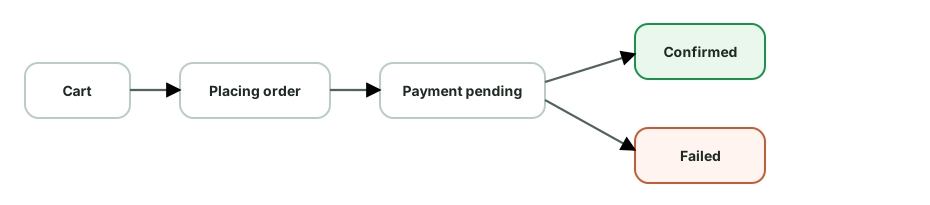
- Persist the in-progress order locally so a crash/kill mid-checkout can resume or reconcile.
- On uncertain outcome (timeout), poll order status rather than re-submitting blindly.
Payment security:
- Avoid handling raw card data. Use a payment-provider SDK or Google Pay so sensitive details are tokenized by the provider. This can reduce PCI scope, but the exact compliance obligation depends on the integration and business.
- Google Pay / payment sheets for a native, secure UX.
- Use TLS, keep payment data out of logs and local storage, and add certificate pinning only when the threat model and operational plan justify it.
Reliability & UX:
- Disable the pay button after tap and show progress to prevent duplicate taps (belt-and-suspenders with idempotency).
- Optimistic but careful - don’t show “confirmed” until the server confirms; show “processing” for pending.
- Validate inventory/price server-side at order time (client prices can be stale/tampered).
- Handle 3-D Secure / OTP redirects and async payment methods (UPI, wallets) via status polling/webhook-driven push.
Other concerns: cart persistence across devices (synced), address validation, retry on transient failures (idempotent), clear error messaging (declined vs network), analytics on funnel drop-off.
Trade-offs to name: optimistic confirmation vs waiting for server (UX vs correctness - here correctness wins), polling vs push for async payment status, how long to retain in-progress order state.
Design a location-tracking / ride-sharing client (like Uber). What are the client concerns?
Optional deep dive: This is useful after you are comfortable with the everyday version of the topic. Focus on the main idea first; the implementation details are a senior-level follow-up.
Requirements: track the user’s location, show nearby drivers/the trip in real time, update the server with location, work with the screen off, all while not draining the battery.
Location acquisition:
- FusedLocationProviderClient (Play Services) - fuses GPS/Wi-Fi/cell for accurate, battery-efficient location. Choose the priority by need:
HIGH_ACCURACYduring an active trip,BALANCED_POWERwhile browsing. - Tune update interval and smallest displacement - request the least frequency/accuracy that satisfies the use case. This is the central battery vs accuracy trade-off.
- Geofencing / activity recognition to trigger updates only when relevant (cheaper than constant polling).
Background & foreground:
- An active trip needs a foreground service with
foregroundServiceType="location"and a persistent notification - required for background location and prevents the OS killing it. - Background location permission (
ACCESS_BACKGROUND_LOCATION) requested separately and justified.
Real-time updates:
- Driver locations stream to the client via WebSocket while foregrounded; FCM for trip status when backgrounded.
- The client uploads its location on an interval - batch points and send periodically (not one request per fix) to save radio/battery; queue when offline and flush on reconnect.
Map & rendering:
- Maps SDK with marker clustering for many drivers; interpolate/animate marker movement between updates for smoothness (don’t snap); draw the route polyline.
- Throttle UI updates to avoid jank.
Offline & resilience:
- Cache the last known location and trip state in Room; degrade gracefully when GPS is weak (show “searching…”).
- Handle permission revocation, location-off, and mock-location detection.
Trade-offs to name: accuracy/frequency vs battery (the big one - HIGH_ACCURACY + 1s updates kills the battery), batching uploads (efficiency vs freshness), foreground service (survivability + permission cost vs a persistent notification), marker interpolation (smoothness vs CPU).
Design a photo gallery app (like Google Photos) with backup.
Optional deep dive: This is useful after you are comfortable with the everyday version of the topic. Focus on the main idea first; the implementation details are a senior-level follow-up.
Requirements: browse thousands of local + cloud photos in a fast grid, view full-res, auto-backup to cloud, work offline.
Browsing performance (huge lists):
- Grid of thumbnails via
LazyVerticalGridwith stable keys andcontentType. - Load photos from
MediaStore(local) + a Room cache of cloud photo metadata; merge and sort by date. - Thumbnails, not full-res - request/generate small thumbnails sized to the grid cell (Coil downsampling). A 12MP photo as a 100dp thumb must not decode at full size (OOM).
- Prefetch rows ahead of scroll; cancel off-screen loads; bound the memory cache.
- For full-res view: load progressively (thumb → full), support pinch-zoom with
BitmapRegionDecoderfor very large images.
Auto-backup (the reliability piece):
- A WorkManager periodic/expedited job scans
MediaStorefor new photos and uploads them - constraints: Wi-Fi/unmetered + charging by default (user-configurable). - Resumable chunked upload so large videos survive interruptions; track per-file upload state in Room.
- Foreground service for large active backups so the OS doesn’t kill them; show progress.
- Idempotency - content hash to skip already-uploaded files and dedupe.
Data model:
- Room caches photo metadata (id, localUri, remoteUrl, takenAt, backupStatus, hash) → instant grid offline.
- Sync cloud library via delta (new/deleted since last sync token).
Other concerns: permissions - Android 13+ granular media permissions or the Photo Picker (no permission) if you only need user-selected photos; scoped storage (content URIs, not file paths); EXIF/orientation handling; cache eviction to bound storage; battery/data awareness.
Trade-offs to name: thumbnail cache size (scroll smoothness vs memory/OOM), prefetch depth (smoothness vs memory/battery), backup constraints (timeliness vs data/battery - Wi-Fi-only delays backup but saves the user’s plan), local thumbnail generation vs server-side variants.
Design an Instagram/WhatsApp Stories feature.
Optional deep dive: This is useful after you are comfortable with the everyday version of the topic. Focus on the main idea first; the implementation details are a senior-level follow-up.
Stories test media prefetching, smooth transitions, and ephemeral state.
Requirements: horizontal tray of users with stories; tap to view full-screen; auto-advance through a user’s segments; swipe to next user; images + videos; seen/unseen state; expire after 24h.
Data model:
stories(userId, segments[], expiresAt)
segment(id, type=IMAGE|VIDEO, url, duration, seenAt?)- Room caches the tray + seen state (works offline, instant tray render).
- Seen state persisted locally and synced to the server.
The make-or-break: prefetching for instant playback.
- When the tray loads, prefetch the first segment of the first few users’ stories.
- While viewing user N, prefetch user N+1’s first segment (and the next segment of the current user). Viewers expect zero load time on tap/advance.
- Use the image library (Coil) for image prefetch and ExoPlayer preloading for video; cap concurrency and cancel prefetch for users scrolled away.
Playback & UX:
- Full-screen pager (
HorizontalPager) of users; within a user, a segment progress indicator that auto-advances on a timer (images) or on video completion. - Gestures: tap right/left = next/prev segment, long-press = pause, swipe down = dismiss, swipe horizontal = next user.
- Preload the next segment’s media before the current finishes so transitions are seamless.
Media handling:
- Images: downsample to screen size; videos: ExoPlayer with a small buffer (segments are short), hardware decode.
- Show a subtle loading state only if prefetch missed.
Lifecycle & ephemerality:
- Pause on background (
repeatOnLifecycle); resume position. - Expire stories after 24h - clean up cache; don’t show expired.
- Upload own story via resumable/chunked upload with optimistic “posting” state.
Trade-offs to name: prefetch depth (instant UX vs data/battery/memory - prefetching everyone’s stories wastes data), buffer size for video, cache retention vs storage, eager vs lazy seen-sync.
Discussion
Comments are powered by GitHub Discussions. Sign in with GitHub to join in.